Get stable QR pay right
Stablecoin QR payments move money fast, but they require precise setup. A single misconfiguration in currency selection or wallet compatibility can delay settlement or trigger unnecessary conversion fees. Before you launch, verify these three operational prerequisites.
1. Verify wallet compatibility
Not all wallets support QR-based stablecoin transactions. Ensure your point-of-sale system and customer wallets use the same blockchain network (e.g., Ethereum, Solana, or Polygon). Cross-chain QR scans often fail or require manual bridging. Test the flow with a small transaction before going live.
2. Confirm currency stability
QR codes encode specific token addresses. If your system defaults to a volatile asset, customers may pay in the wrong currency. Configure your checkout to accept only USDC or USDT, and ensure your backend instantly converts or settles in your local fiat currency if needed. This prevents exchange rate risk during the scanning window.
3. Test the end-to-end flow
Simulate a full customer journey: scan, confirm, and receive. Check that your merchant dashboard updates in real-time. Also, verify that your QR code is scannable from a distance and under various lighting conditions. A blurry or low-contrast code increases abandonment rates. Keep your integration simple to avoid friction.
Set up seamless stablecoin QR payments
Switching to stablecoin QR payments requires configuring a wallet that supports QR standards, choosing a stablecoin pegged to your target currency, and linking a merchant settlement service. This setup lets customers scan a code to pay in crypto while you receive local fiat or stable value instantly.
Step 1: Choose a QR-enabled stablecoin wallet
Select a self-custodial wallet that explicitly supports QR code transactions. Trust Wallet is a widely used option that allows users to spend stablecoins directly via QR codes without exposing private keys to a third-party server.
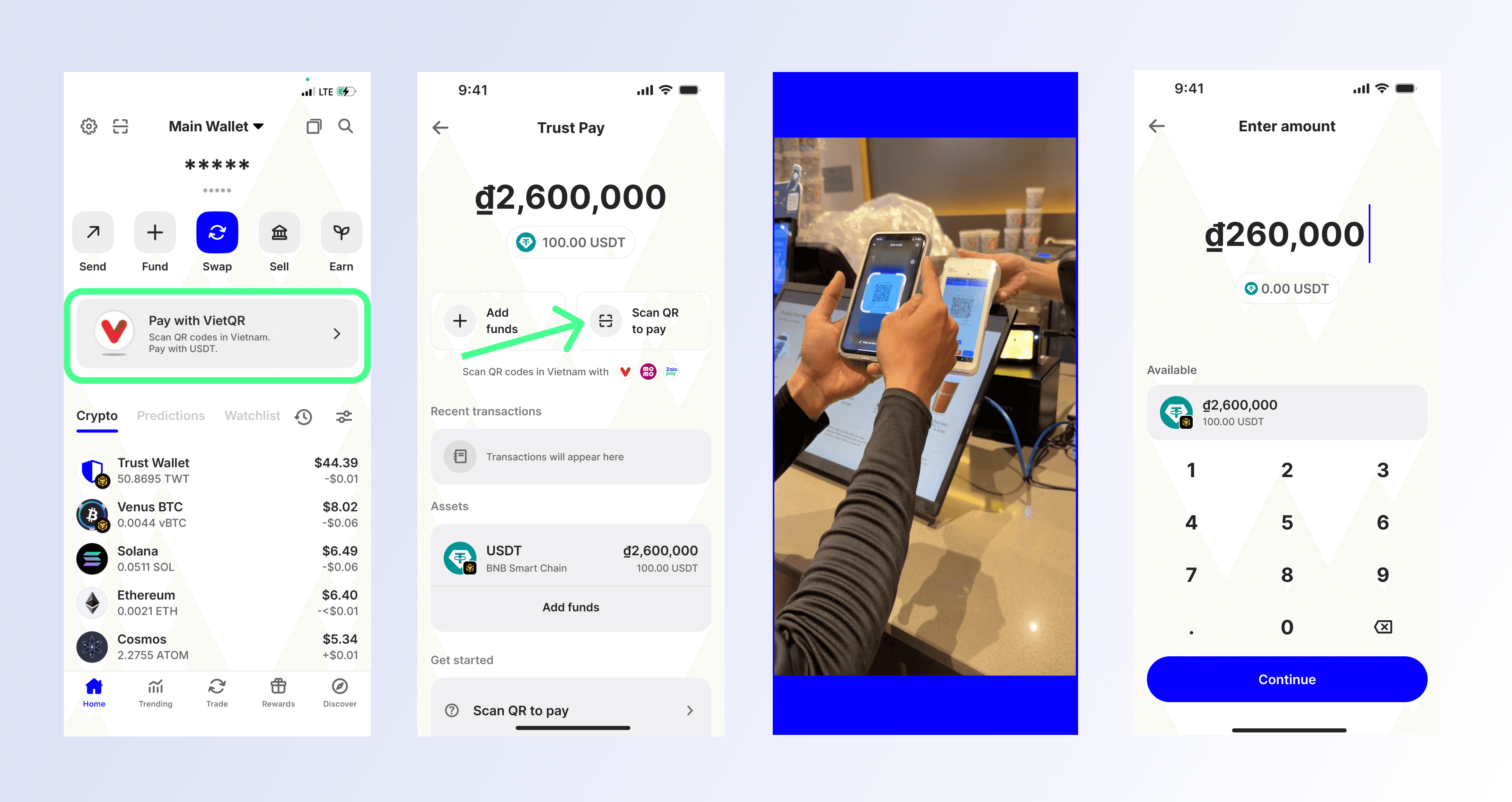
Look for wallets that support the ERC-20 or TRC-19 standards for QR payments. Ensure the wallet displays a clear QR code generator for sending payments. Avoid wallets that require manual address copying for small transactions, as this breaks the seamless flow.
Purchase a stablecoin such as USDC or USDT on a reputable exchange. Transfer these funds to your chosen wallet address. Verify the network matches the wallet’s supported chains to avoid frozen assets.

Navigate to the receive or pay section of the app. Select the specific stablecoin asset. The app will generate a dynamic QR code that encodes the transaction details, including the amount and recipient address.
Initiate a small test payment to a secondary wallet or merchant account. Confirm that the QR code scans correctly on another device and that the funds clear without excessive network fees. Check the transaction confirmation time to ensure it meets your speed requirements.
Step 2: Configure merchant settlement
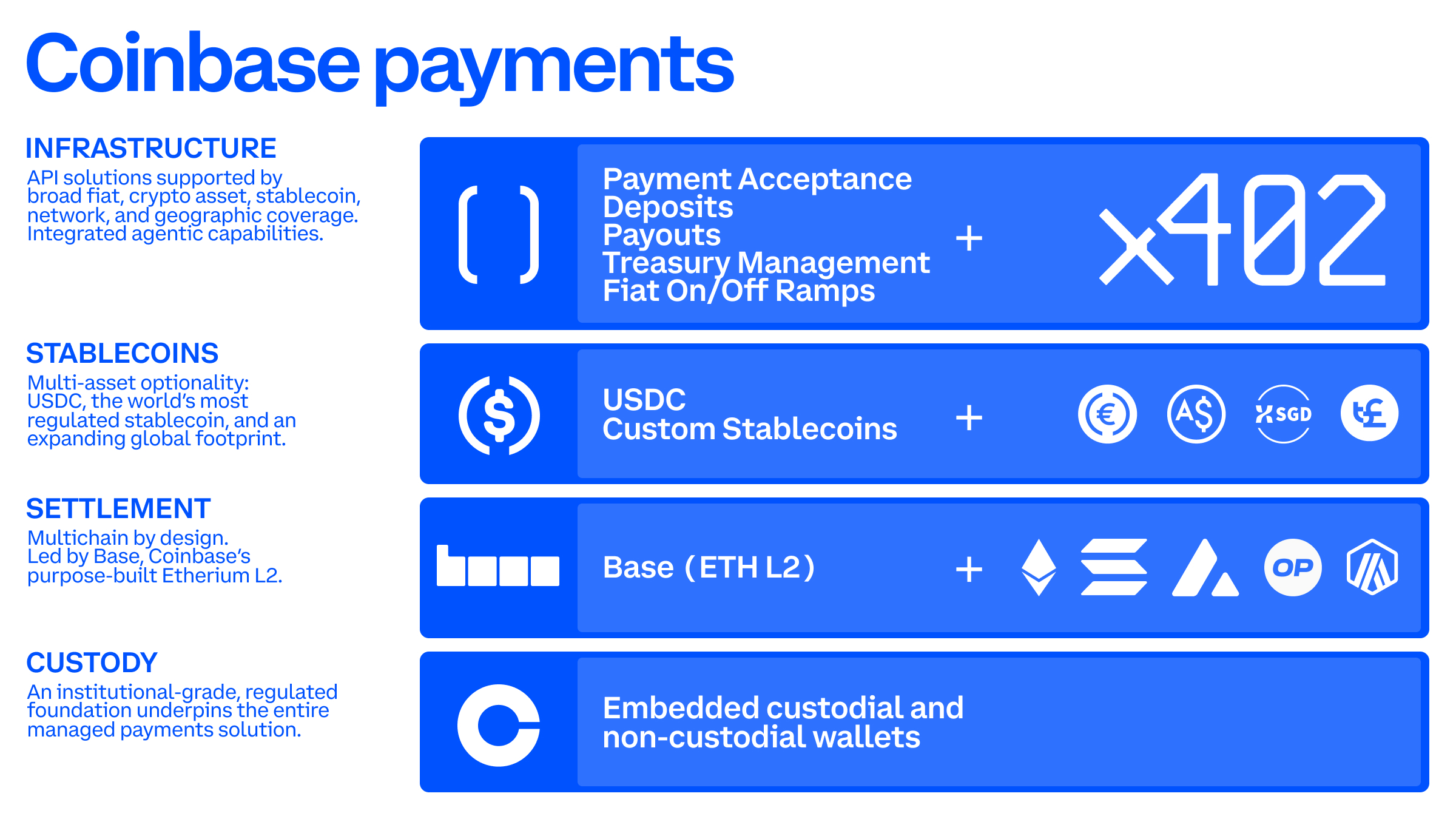
If you are a business, you need a mechanism to convert incoming stablecoins into local currency or hold them as stable value. Services like Circle’s Payment Network (CPN) or Stripe’s crypto integrations allow merchants to accept stablecoin QR payments and settle in fiat.
- Register with a settlement provider: Sign up for a payment processor that supports stablecoin QR acceptance. Provide necessary business documentation for compliance.
- Link your bank account: Connect your local bank account to receive fiat settlements. This ensures you can manage cash flow in your local currency.
- Generate your merchant QR: The provider will issue a static or dynamic QR code for your point-of-sale system. Customers scan this code to pay, and the provider handles the blockchain transaction and fiat conversion.
Step 3: Verify security and compliance
Stablecoin payments are secure if configured correctly. Ensure your wallet uses biometric authentication or hardware security modules. For merchants, verify that your settlement provider is regulated in your jurisdiction. Regularly audit transaction logs for unauthorized access.
-
Enable biometric lock on wallet app
-
Verify settlement provider regulatory status
-
Test QR code expiration settings
-
Confirm network fee limits are set
Common QR Pay Mistakes to Avoid
Even with a seamless stablecoin QR payment system, small configuration errors can lead to failed transactions, lost revenue, or security gaps. Most of these issues stem from how the QR code is generated and how the merchant account is set up. Fixing these mistakes ensures your business accepts payments reliably.
Using Static QR Codes for Every Transaction
A static QR code displays the same payment address every time. While easy to set up, it poses a significant security risk. Because the address never changes, it can be copied, pasted, or replaced by malicious actors on public displays. It also lacks real-time validation, meaning a customer might send funds to an expired or incorrect address without immediate feedback.
The Fix: Use dynamic QR codes that generate a unique, session-specific payment request for each transaction. Dynamic codes allow your system to verify the amount and currency before the customer confirms the payment. This prevents overpayments, underpayments, and address spoofing. Most stablecoin payment gateways support dynamic code generation via API or dashboard settings.
Ignoring Network Compatibility
Stablecoins exist on multiple blockchains (e.g., Ethereum, Solana, Polygon). If your QR code encodes an address for one network but the customer pays using another, the funds may be lost permanently or require complex recovery. Many businesses fail to specify the network in the QR payload, relying on the wallet app to guess correctly.
The Fix: Explicitly define the blockchain network in your QR code parameters. When integrating a payment gateway, ensure the system defaults to a low-cost, high-speed network like Polygon or Solana for QR transactions. Clearly display the accepted network to customers to reduce confusion. Never accept "any network" without strict validation rules.
Skipping Fee Clarity
Blockchain transactions require gas fees. If your QR code does not account for who pays the network fee, customers may abandon the checkout when their wallet shows an unexpected gas cost. This friction kills conversion rates, especially for small-ticket items where the fee might exceed the purchase price.
The Fix: Implement "gasless" transactions or clearly separate the gas fee from the product price. Some stablecoin QR solutions allow merchants to subsidize gas fees or use layer-2 solutions where fees are negligible. Display the total cost upfront, including any network fees, so the customer sees the exact amount to pay before scanning.
Stable qr pay: what to check next
Stablecoin QR payments remove the friction of traditional card networks by using blockchain-based settlements. Before switching your business to this model, it helps to understand the practical implications for security, setup, and acceptance.
No comments yet. Be the first to share your thoughts!